 DisplayTune
Custom crosshair overlay for Rust
When you hip-fire in Rust there is barely any crosshair — a tiny dot lost against bright textures. A separate crosshair overlay keeps the center of the screen always visible.
Why a crosshair in Rust
- The default dot disappears on snow, sky and bright textures.
- Helps with shotgun and pistol hip-fire and close combat.
- Tune it to your monitor: color, contrasting outline, size.
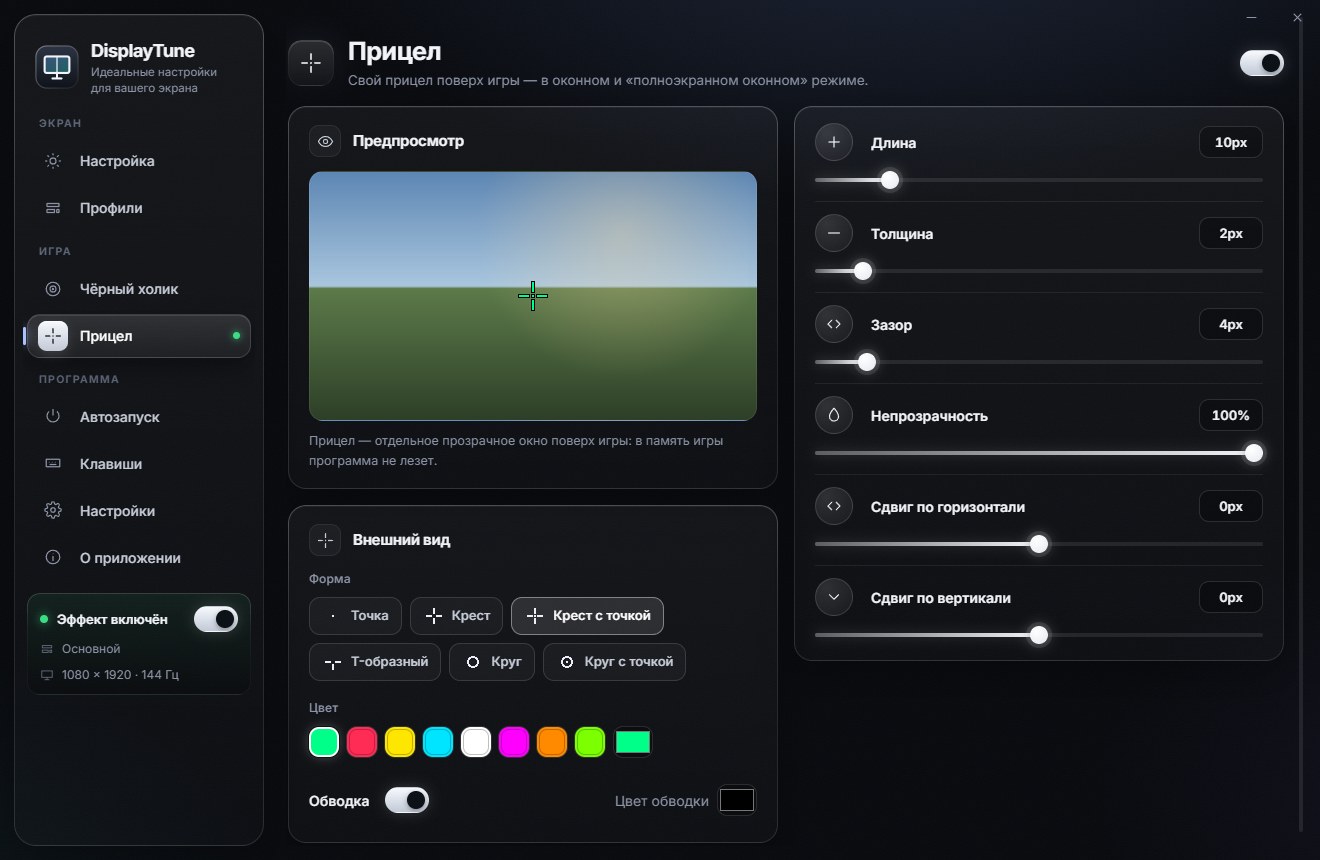
Shapes
| Shape | Good for |
|---|---|
| Dot | Minimal, never covers the target |
| Cross | Classic shooter crosshair |
| Cross with dot | Precise center + visibility |
| T-shape | Covers less of the target above |
| Circle | Close range, shotguns |
| Circle with dot | All-round |
Recommended settings
- Color: bright green or cyan is visible almost everywhere; magenta or red on snow.
- Outline: turn on a black outline so it shows on both light and dark backgrounds.
- Size 6–10 px, thickness 2 px, gap 3–4 px for a cross.
- Offset: nudge it on X and Y if your center is off because of an unusual resolution.
Display mode
Like the black holo, the crosshair shows in windowed and borderless fullscreen. In competitive games with their own crosshair editors (CS2, Valorant) use the built-in one — see DisplayTune and anti-cheat.
Six shapes, any color, outline and offset. The crosshair is a separate transparent window; the app never reads game memory. First day free.
Try it freePricing — from 200 RUBWant to see how it looks first? Load your own screenshot into the free Vibrance simulator →
Frequently asked questions
Where is a crosshair overlay useful?
In games with no crosshair or a hard-to-see one: Rust, DayZ, SCUM and other survival games. In CS2 and Valorant the built-in editor is better.
Why is the crosshair not visible in game?
Make sure the game is in windowed or borderless fullscreen — in exclusive fullscreen, windows on top may be hidden.
Can I hide the crosshair quickly?
Yes, assign the "Show / hide crosshair" hotkey in the Hotkeys tab.