 DisplayTune
Per-game color profiles in DisplayTune
One saturation for everything is the biggest flaw of the driver panel: what looks great in Rust hurts in a browser. Auto profiles fix that — DisplayTune switches the right color on when a game is in focus.
How auto profiles work
The app watches which window is active. If it is a game from the list, its profile turns on; minimize or quit and your normal color comes back. The transition is smooth, with no flicker.
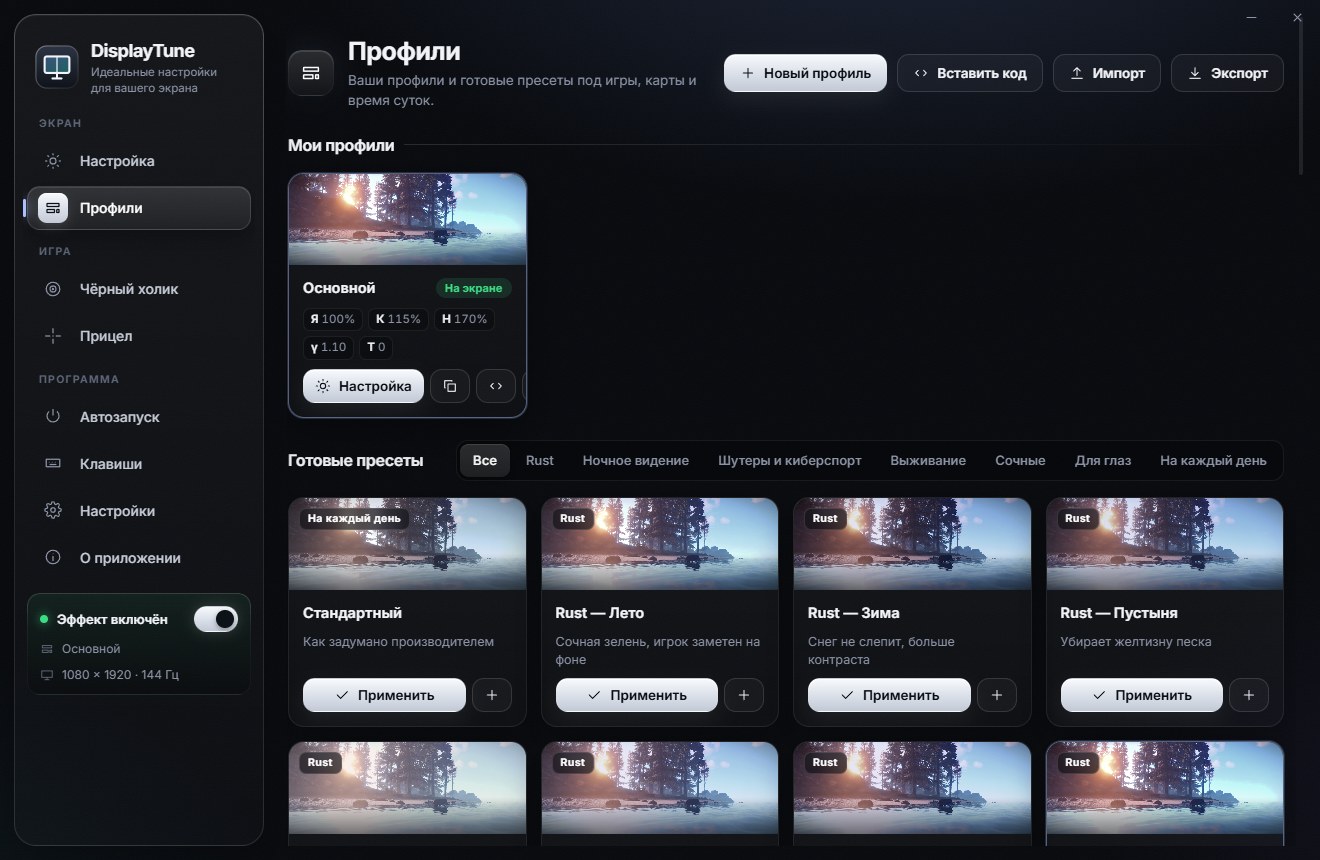
Games out of the box
Rust, Counter-Strike 2, Valorant, PUBG, Fortnite, Apex Legends, Dota 2, Escape from Tarkov, DayZ, Call of Duty, Overwatch 2, Rainbow Six Siege, Hunt: Showdown, The Finals, Marvel Rivals, League of Legends, SCUM, 7 Days to Die, Arma 3, GTA V, Battlefield 2042, Dead by Daylight, Squad, Warframe, S.T.A.L.K.E.R. 2 and Delta Force. Add any other game by pointing to its .exe file.
Preset groups
| Group | Examples | Saturation |
|---|---|---|
| Rust | Summer, Winter, Night, PvP, Raid, Caves & monuments, Snow without glare | 115–350% |
| Night vision | Night vision, Dusk, Night like day, NVG effect | 90–125% |
| Shooters & esports | CS2 — Esports, Valorant, Apex Legends, Fortnite, Overwatch 2 | 135–230% |
| Survival | Tarkov — Shadows, DayZ — Night, SCUM, Hunt: Showdown, S.T.A.L.K.E.R. 2 | 118–140% |
| Vivid | Vivid, Neon, HDR look, Limit 350% | 145–350% |
| Eye comfort | Reading, Warm evening, Less blue, Paper | 70–100% |
| Everyday | Standard, Movie, Cool, Deep contrast | 0–110% |
Your own profile in a minute
- Pick the closest preset and fine-tune the sliders on the Tuning tab.
- Save it as a new profile with a clear name.
- Bind it to a game and forget about it — everything switches on by itself.
You can share a profile: the app gives you a short code, a friend pastes it and gets the same settings. A profile can also run on a schedule — for example, warm colors after 10 pm. Switching by hand is covered in color hotkeys.
Saturation up to 350%, brightness, contrast, gamma and temperature, per-game profiles that switch on automatically, and hotkeys. Works on NVIDIA, AMD and Intel. First day free.
Try it freePricing — from 200 RUBWant to see how it looks first? Load your own screenshot into the free Vibrance simulator →
Frequently asked questions
Can I add a game that is not on the list?
Yes, point to its .exe file and the profile switches on automatically the same way.
What happens when I minimize the game?
Your normal desktop profile comes back. When you return to the game, its profile turns on again.
Are profiles kept after an app update?
Yes, profiles and settings are stored separately from the app and survive updates.