 DisplayTune
Black holo sight for Rust
The holosight is one of the most popular sights in Rust, but its green reticle nearly vanishes against grass, leaves and green buildings. The black holo recolors the reticle right on top of the game.
The problem with the green reticle
The reticle glows green. In summer half the map is grass and trees of the same color, so the circle keeps fading in and out — especially at range and with raised saturation, which makes the green background even brighter.
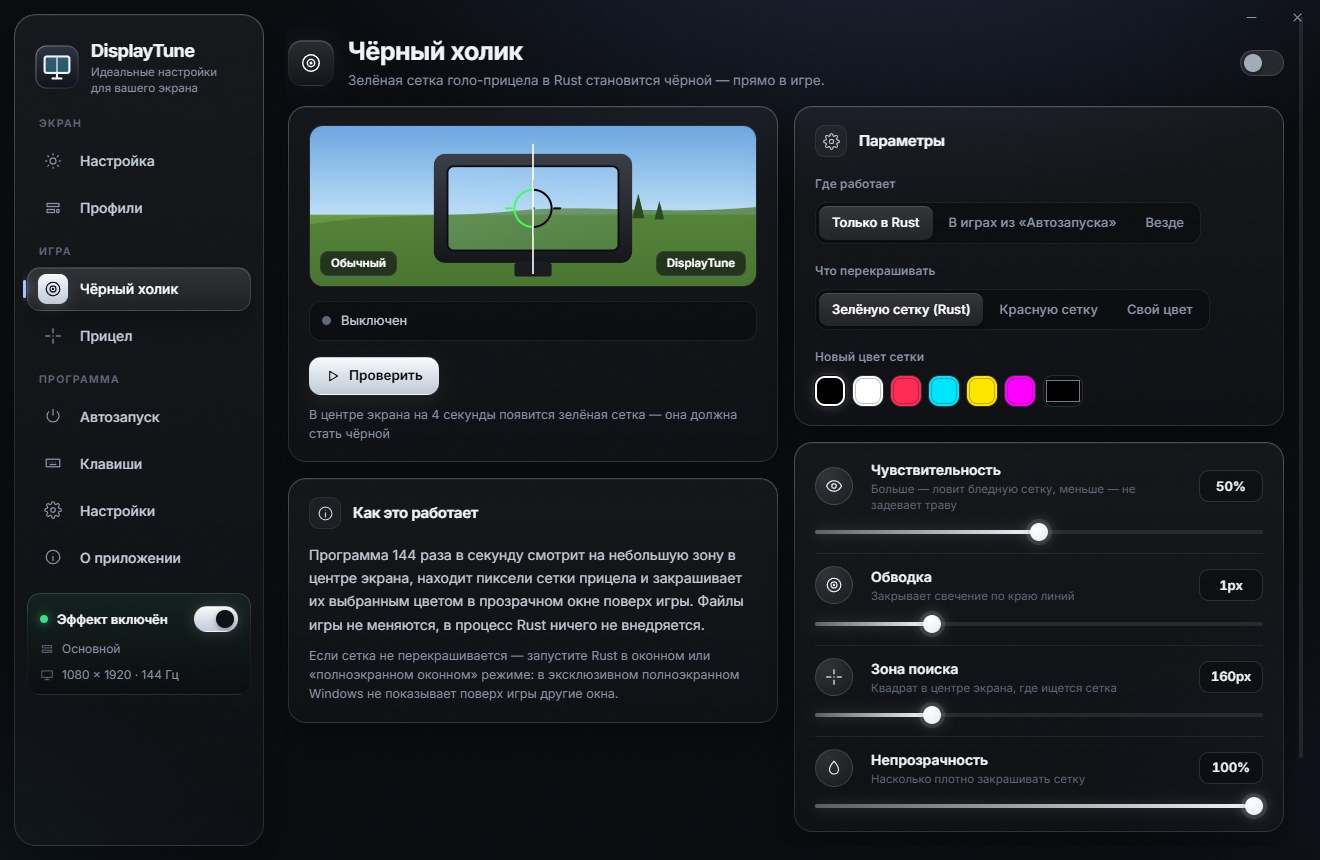
How it works
DisplayTune looks at a small square in the center of the screen, finds the reticle lines and draws your chosen color over them in a separate transparent window. Rust files and memory are untouched — it is just a drawing on top of the image.
Setup
- Open the Black holo tab and turn it on.
- Where: "Rust only" (recommended), "Games from the list" or "Everywhere".
- What to recolor: "Green reticle (Rust)"; there is also "Red reticle" and "Custom color".
- Color: black by default; white, red, cyan, yellow or any custom color.
- Click "Test" to preview it on a test reticle.
Fine tuning
| Setting | What it changes | Tip |
|---|---|---|
| Sensitivity | How green a pixel must be | 50%; higher if parts are missed |
| Thickness | Extra width of the line | 1 px |
| Zone size | Search square in the center | 160 px |
| Opacity | Strength of the new color | 100% |
| Frequency | Updates per second | Match your monitor: 144 or 240 |
Requirements
The holo works in windowed and borderless fullscreen modes. In exclusive fullscreen, windows on top of the game may not show. It also needs Windows 10 version 2004 or newer (or Windows 11): older builds cannot hide the overlay from screen capture, which causes flicker.
The reticle is recolored black or any color on top of the game; the app never touches Rust files. Plus color profiles for every biome. First day free.
Try it freePricing — from 200 RUBWant to see how it looks first? Load your own screenshot into the free Vibrance simulator →
Frequently asked questions
Does the black holo cost FPS?
Very little: only a small square in the center is analyzed. You can lower the update rate to 60–120 on a weak PC.
Why is the black holo not visible in game?
Most likely Rust runs in exclusive fullscreen. Switch to borderless fullscreen. On Windows 10 older than version 2004 it flickers — update Windows.
Which color is best?
Black in daytime — it contrasts with grass, sky and snow. White at night and in dark places.