 DisplayTune
Digital vibrance simulator
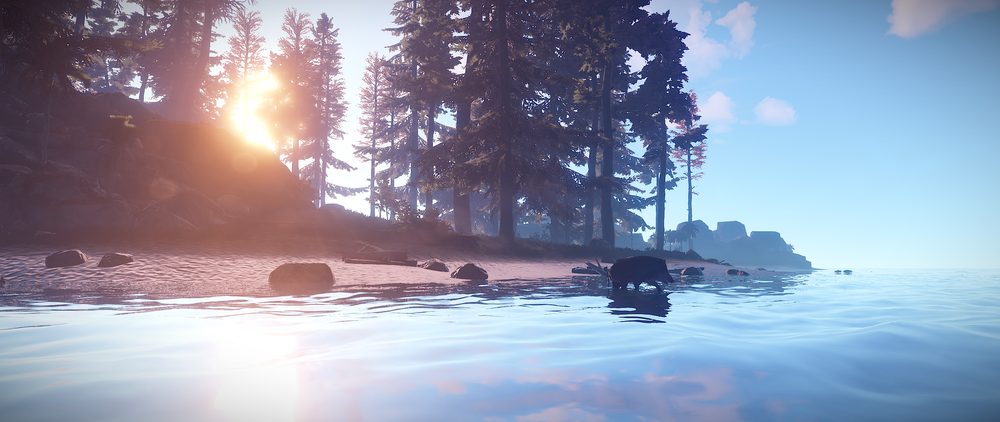
Upload a screenshot from your game (or use our Rust scene), pick a preset or move the sliders, and drag the divider to compare. The effect uses the same formulas as DisplayTune — plus the equivalent values for the NVIDIA and AMD control panels.
AMD saturation ≈
How to apply these settings
- In DisplayTune: copy the code → Profiles tab → Paste code. All 63 presets are built into the app; bind a profile to a game and it switches on by itself.
- NVIDIA: NVIDIA Control Panel → Adjust desktop color settings → Digital vibrance — use the NVIDIA value shown above. Brightness, contrast and gamma are on the same page. Details — guide.
- AMD: Adrenalin → Display → Custom Color → Saturation. Details — guide.
- The driver panel keeps one value for everything and stops at 200% saturation — per-game profiles and values beyond that limit are only in the app.
All 63 DisplayTune presets
Values are the same as in the app. "Preview" loads the preset into the simulator.
Rust
| Preset | Sat. | Bright. | Contrast | Gamma | Temp. | NVIDIA ≈ | |
|---|---|---|---|---|---|---|---|
| Rust — SummerRich greens, players stand out | 155% | 100 | 106 | 1.05 | 0 | 78% | Preview |
| Rust — WinterNo snow glare, more contrast | 135% | 92 | 112 | 0.95 | -10 | 68% | Preview |
| Rust — DesertRemoves the sand’s yellow cast | 140% | 98 | 110 | 1.00 | -18 | 70% | Preview |
| Rust — NightSee in the dark, sky not blown out | 120% | 112 | 104 | 1.60 | +6 | 60% | Preview |
| Rust — ForestBrighter under the trees | 150% | 104 | 108 | 1.20 | -4 | 75% | Preview |
| Rust — Fog & rainClearer silhouettes in haze | 140% | 100 | 118 | 1.10 | -6 | 70% | Preview |
| Rust — PvPMaximum colour and contrast for fights | 170% | 100 | 115 | 1.10 | 0 | 85% | Preview |
| Rust — Caves & monumentsLighter shadows indoors | 115% | 114 | 100 | 1.75 | +4 | 58% | Preview |
| Rust — SunsetThe sun no longer blinds you | 150% | 100 | 108 | 1.10 | -12 | 75% | Preview |
| Rust — RaidBright, see into building shadows | 190% | 104 | 114 | 1.10 | 0 | 95% | Preview |
| Rust — MonumentsBrighter inside monuments and buildings | 160% | 108 | 106 | 1.30 | 0 | 80% | Preview |
| Rust — OceanLess glare on the water | 150% | 100 | 110 | 1.00 | -8 | 75% | Preview |
| Rust — Snow without glareSofter white, clearer silhouettes | 140% | 94 | 114 | 1.00 | -6 | 70% | Preview |
| Rust — Ultra 260%Saturation beyond the driver | 260% | 100 | 118 | 1.10 | 0 | 100%+ | Preview |
| Rust — Maximum 350%Saturation at the limit | 350% | 100 | 120 | 1.10 | 0 | 100%+ | Preview |
Night vision
| Preset | Sat. | Bright. | Contrast | Gamma | Temp. | NVIDIA ≈ | |
|---|---|---|---|---|---|---|---|
| Night visionSee as much as possible in the dark | 110% | 120 | 100 | 1.90 | 0 | 55% | Preview |
| Dark roomsBuildings, basements, bunkers | 110% | 115 | 96 | 1.70 | 0 | 55% | Preview |
| DuskEvening and dawn without losing colour | 125% | 108 | 104 | 1.40 | -6 | 63% | Preview |
| MoonlightCool light, bright shadows | 105% | 118 | 98 | 2.00 | -14 | 53% | Preview |
| Night like dayExtremely bright shadows | 110% | 125 | 98 | 2.40 | 0 | 55% | Preview |
| NVG effectGreen phosphor, see in the dark | 90% | 118 | 100 | 1.90 | 0 | 45% | Preview |
| Shadows onlyDark areas brighter, sky not blown out | 115% | 104 | 100 | 1.25 | 0 | 58% | Preview |
Shooters & esports
| Preset | Sat. | Bright. | Contrast | Gamma | Temp. | NVIDIA ≈ | |
|---|---|---|---|---|---|---|---|
| CS2 — EsportsBright models, sharp silhouettes | 165% | 100 | 108 | 1.05 | -4 | 83% | Preview |
| CS2 — Vibrance 230%Like the pros, but stronger | 230% | 100 | 112 | 1.05 | -4 | 100%+ | Preview |
| ValorantClean, rich colours | 140% | 100 | 104 | 1.00 | 0 | 70% | Preview |
| PUBG — Long rangeBetter visibility at distance | 140% | 102 | 112 | 1.15 | -6 | 70% | Preview |
| Apex LegendsBright picture without overexposure | 150% | 100 | 108 | 1.05 | 0 | 75% | Preview |
| FortniteJuicy colours | 175% | 100 | 104 | 1.00 | 0 | 88% | Preview |
| Dota 2Clearer spells and effects | 135% | 100 | 106 | 1.00 | 0 | 68% | Preview |
| Overwatch 2Clean bright colours | 150% | 100 | 106 | 1.00 | 0 | 75% | Preview |
| Rainbow Six SiegeBrighter dark corners | 145% | 104 | 110 | 1.20 | -4 | 73% | Preview |
| Call of Duty / WarzoneRange and shadows | 150% | 102 | 110 | 1.15 | -4 | 75% | Preview |
| The FinalsRich and contrasty | 160% | 100 | 108 | 1.00 | 0 | 80% | Preview |
| Marvel RivalsBright heroes and effects | 170% | 100 | 104 | 1.00 | 0 | 85% | Preview |
| League of LegendsCrisp, no blown highlights | 140% | 100 | 104 | 1.00 | 0 | 70% | Preview |
Survival
| Preset | Sat. | Bright. | Contrast | Gamma | Temp. | NVIDIA ≈ | |
|---|---|---|---|---|---|---|---|
| Tarkov — ShadowsBrighter dark corners | 120% | 110 | 100 | 1.50 | +4 | 60% | Preview |
| DayZ — NightSee at night without NVGs | 118% | 116 | 100 | 1.80 | +8 | 59% | Preview |
| SCUMBrighter forest and shadows | 140% | 106 | 108 | 1.25 | -6 | 70% | Preview |
| Hunt: ShowdownSee in swamps and at dusk | 125% | 110 | 104 | 1.50 | 0 | 63% | Preview |
| 7 Days to DieBrighter nights and interiors | 130% | 112 | 100 | 1.60 | +4 | 65% | Preview |
| Arma 3Range without sky glare | 135% | 100 | 110 | 1.10 | -8 | 68% | Preview |
| S.T.A.L.K.E.R. 2Brighter in the Zone and tunnels | 130% | 108 | 106 | 1.35 | -4 | 65% | Preview |
Vivid
| Preset | Sat. | Bright. | Contrast | Gamma | Temp. | NVIDIA ≈ | |
|---|---|---|---|---|---|---|---|
| VividMaximum saturation | 180% | 100 | 104 | 1.00 | 0 | 90% | Preview |
| HDR lookDeep contrast | 145% | 100 | 120 | 0.90 | 0 | 73% | Preview |
| Super vivid 250%Stronger than the driver allows | 250% | 100 | 108 | 1.00 | 0 | 100%+ | Preview |
| Limit 350%Maximum saturation | 350% | 100 | 110 | 1.00 | 0 | 100%+ | Preview |
| NeonCool bright tone | 220% | 100 | 115 | 0.95 | -10 | 100%+ | Preview |
| Warm vividBright colours with a warm tint | 200% | 100 | 106 | 1.00 | +15 | 100% | Preview |
| Anime & cartoonsBright clean colours | 190% | 104 | 104 | 1.05 | 0 | 95% | Preview |
Eye comfort
| Preset | Sat. | Bright. | Contrast | Gamma | Temp. | NVIDIA ≈ | |
|---|---|---|---|---|---|---|---|
| ReadingLess blue, less eye strain | 90% | 88 | 96 | 1.00 | +45 | 45% | Preview |
| Warm eveningFor gaming and work at night | 100% | 92 | 100 | 1.00 | +60 | 50% | Preview |
| SoftCalm picture without harshness | 95% | 96 | 90 | 1.05 | +10 | 48% | Preview |
| Night shiftMinimum blue late at night | 95% | 85 | 96 | 1.00 | +75 | 48% | Preview |
| Less blueLess eye strain | 100% | 95 | 100 | 1.00 | +35 | 50% | Preview |
| DimmedFor a dark room | 100% | 70 | 100 | 1.00 | +10 | 50% | Preview |
| PaperSoft, like an e-reader | 70% | 92 | 94 | 1.00 | +25 | 35% | Preview |
Everyday
| Preset | Sat. | Bright. | Contrast | Gamma | Temp. | NVIDIA ≈ | |
|---|---|---|---|---|---|---|---|
| StandardAs the manufacturer intended | 100% | 100 | 100 | 1.00 | 0 | 50% | Preview |
| MovieSoft cinematic tone | 110% | 96 | 108 | 0.95 | +8 | 55% | Preview |
| CoolFresh bluish tone | 110% | 100 | 104 | 1.00 | -35 | 55% | Preview |
| Deep contrastBlacker blacks, brighter whites | 110% | 100 | 130 | 1.00 | 0 | 55% | Preview |
| FlatSoft shadows — for recording and streams | 95% | 100 | 85 | 1.00 | 0 | 48% | Preview |
| SepiaWarm vintage tone | 0% | 100 | 104 | 1.00 | +60 | 0% | Preview |
| Black & whiteNo colour | 0% | 100 | 110 | 1.00 | 0 | 0% | Preview |
DisplayTune keeps a profile with saturation, gamma and brightness for every game and switches it on automatically. Saturation up to 350%, NVIDIA, AMD and Intel. First day free.
Try it freeAbout the appFrequently asked questions
How accurate is the simulator?
It uses the same formulas as DisplayTune: a saturation matrix plus the GPU gamma ramp (contrast, brightness, shadows, highlights, gamma, temperature). On screen the result also depends on your monitor, its picture mode and the game's own settings, and NVIDIA and AMD driver saturation work slightly differently — but the difference is small.
Is my screenshot uploaded anywhere?
No. The image is opened right in your browser and never sent anywhere.
How do I share my settings?
Click "Copy link to this look" — the link opens the simulator with your settings for a friend. The DF2-… code can be pasted into DisplayTune on the Profiles tab.
What NVIDIA digital vibrance equals 150%?
About 75%: in the NVIDIA panel 50% means no change and 100% is the driver maximum, roughly 200%.